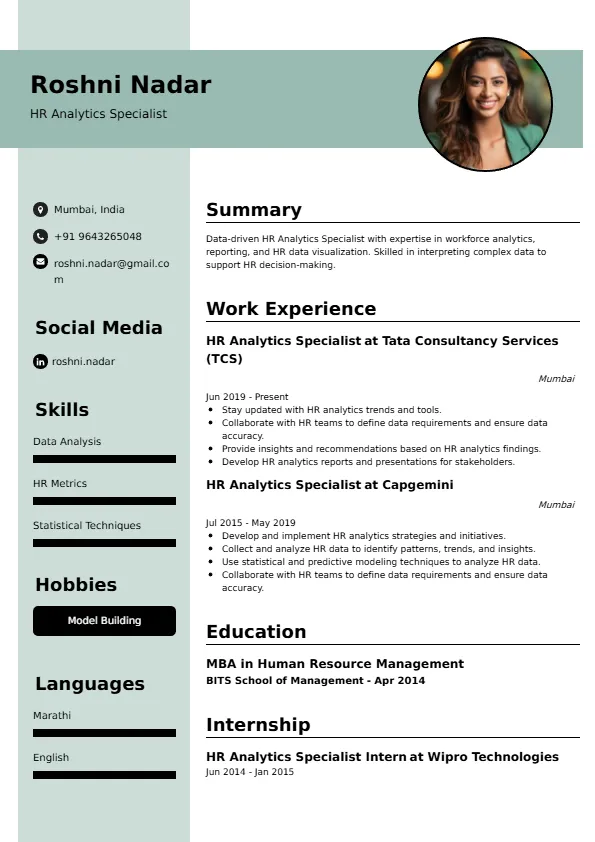
HR Analytics Specialist
Welcome to our HR Analytics Specialist resume sample page! This expertly crafted resume template is designed to showcase your expertise in collecting, cleaning, analyzing, and visualizing HR and people data to identify trends and provide actionable insights to HR leaders and business partners. Whether you're an entry-level candidate or a seasoned professional, this sample highlights key skills like SQL querying, data visualization (Tableau/Power BI), statistical analysis (regression, correlation), data governance, and HR metrics reporting tailored to meet top corporate HR demands. Use this guide to create a compelling resume that stands out and secures your next career opportunity.
Superbresume.com empowers HR Analytics Specialists to craft resumes that highlight their data manipulation and actionable insight expertise. Our platform offers customizable templates tailored for technical HR roles, emphasizing skills like advanced report creation (in HRIS/BI tools), statistical testing, data cleaning/ETL processes, and dashboard development. With ATS-optimized formats, expert-written content suggestions, and real-time resume analysis, we ensure your resume aligns with job descriptions. Showcase your experience in delivering comprehensive quarterly talent reports, successfully automating manual data processes, or providing key data analysis that informed a major HR policy change with confidence. Superbresume.com helps you create a polished, results-driven resume that grabs hiring managers’ attention and lands interviews.
How to Write a Resume for an HR Analytics Specialist
Craft a Targeted Summary: Write a 2-3 sentence summary highlighting your expertise in HR data analysis and reporting, proficiency in SQL and data visualization tools, and success in translating complex HR metrics into clear, actionable business insights.
Use Reverse-Chronological Format: List recent HR analytics, data reporting, or quantitative HR roles first, focusing on measurable analytical achievements and reporting efficiency.
Highlight Certifications/Training: Include credentials like SHRM-CP, relevant BI tool certifications (e.g., Tableau Desktop), SQL expertise certifications, or relevant degrees (Statistics/Data Science) to boost credibility.
Quantify Achievements: Use metrics, e.g., “Automated 5 key monthly HR reports using SQL and Power BI, saving the team 20 hours of manual work monthly,” or “Provided data analysis that led to a 10% reduction in new hire turnover by identifying an onboarding gap,” to show impact.
Incorporate Keywords: Use terms like “HR Data Analysis,” “SQL Querying,” “Data Visualization (Tableau/Power BI),” “HR Metrics Reporting (Turnover, Headcount),” “Statistical Analysis (Correlation),” “HRIS Reporting (Workday/SuccessFactors),” or “Data Integrity/Cleaning” from job descriptions for ATS.
Detail Technical Skills: List proficiency with specific statistical languages (Python/R, if applicable), advanced SQL, BI tools, HRIS reporting functions, data cleaning tools, and Excel for analysis in a comprehensive skills section.
Showcase Analytics Projects: Highlight 3-4 key analytical projects (e.g., compensation correlation study, time-to-fill driver analysis, engagement survey deep dive), detailing the methodology, the challenge, and the quantified HR/business outcome.
Emphasize Soft Skills: Include analytical rigor, attention to detail (data quality), strong communication (explaining findings), and collaboration (with HRBPs/Recruiters).
Keep It Concise: Limit your resume to 1-2 pages, focusing on relevant data analysis, reporting, and problem-solving experience.
Proofread Thoroughly: Eliminate typos or jargon for a professional document.
Advanced SQL and Data Wrangling: Focus on expertise writing complex SQL queries (joins, window functions) to extract and transform data from disparate HRIS/ATS systems into a clean format for analysis.
Dashboard Design and Maintenance: Highlight proficiency creating and maintaining interactive, user-friendly dashboards in platforms like Tableau or Power BI that provide HR leaders and business partners with self-service insights.
DEI and Equity Reporting: Showcase experience analyzing demographic data, running statistical tests for adverse impact, and creating detailed reports on diversity metrics across the talent pipeline.
Data Automation (ETL/ELT): Detail experience building simple data pipelines (using tools like Informatica, Alteryx, or Python scripting) to automate the flow of raw HR data into the analytical environment.
Survey Data Analysis: Emphasize skills in analyzing employee engagement, pulse, or exit survey data, including performing correlation analysis and identifying statistically significant drivers of satisfaction/turnover.
Metrics-Driven Achievements: Use results like “Automated the generation of 10 monthly reports, freeing up 15% of the HRBP’s time for strategic work” or “Identified a statistically significant link between training completion and performance scores.”
HRIS Reporting Function Mastery: Include deep technical expertise in the reporting modules of major HRIS systems (Workday Report Writer, SuccessFactors Ad Hoc Reporting).
Cross-Functional Data Linkage: Highlight experience successfully linking HR data (e.g., tenure, performance) with non-HR data (e.g., safety incidents, sales figures) to prove the business value of people programs.
Choose Superbresume.com to craft an HR Analytics Specialist resume that stands out in the growing HR data field. Our platform offers tailored templates optimized for ATS, ensuring your skills in SQL querying, BI tools, and data interpretation shine. With expert guidance, pre-written content, and real-time feedback, we help you highlight achievements like automating reports or providing key data that drove policy changes. Whether you focus on reporting or statistical analysis, our tools make it easy to create a polished, results-driven resume. Trust Superbresume.com to showcase your expertise in translating people data into actionable business intelligence. Start building your career today!
20 Key Skills for an HR Analytics Specialist Resume
| SQL Querying & Database Management (Cloud/On-Prem) | Data Visualization (Tableau, Power BI, Looker) |
| HR Metrics Reporting (Headcount, Turnover, Time-to-Hire) | Statistical Analysis (Correlation, T-Tests, Regression) |
| HRIS Reporting & Data Extraction (Workday Report Writer) | Data Integrity, Cleaning, & Validation |
| Advanced MS Excel (VLOOKUP, Pivot Tables) | Dashboard Development & Maintenance |
| Survey Data Analysis (Qualtrics, Glint) | EEO/DEI Reporting & Analysis |
| Basic Python/R (Scripting/Statistical Libraries) | Cross-Functional Collaboration (HRBP, Finance) |
| Data Storytelling & Presentation | Confidential Data Handling (GDPR/HIPAA) |
10 Do’s for an HR Analytics Specialist Resume
Tailor Your Resume: Customize for the company’s HRIS platform (e.g., specifically list Workday or SuccessFactors reporting experience) and the analytical focus.
Highlight Certifications/Training: List relevant BI tool (Tableau/Power BI) and SQL certifications prominently.
Quantify Achievements: Include metrics on time savings from automation, percentage reduction in data errors, impact of analysis (e.g., turnover reduction), or complexity of dashboards built.
Use Action Verbs: Start bullet points with verbs like “analyzed,” “visualized,” “queried,” “automated,” or “reported.”
Showcase Analytical Projects: Detail the methodology and the strategic business/HR outcome of 3-4 key analytical or reporting projects.
Include Soft Skills: Highlight analytical rigor, attention to data quality, strong communication (data storytelling), and collaboration with non-technical stakeholders.
Optimize for ATS: Use standard analytics/data section titles and incorporate key software, statistical, and HR metric terms.
Keep It Professional: Use a clean, consistent font and professional layout.
Emphasize SQL and Visualization: Clearly articulate expertise in both the technical data wrangling (SQL) and the presentation layer (BI tools).
Proofread Thoroughly: Ensure no typos or errors in statistical terms, software names, or metrics.
10 Don’ts for an HR Analytics Specialist Resume
Don’t Overload with Jargon: Avoid confusing, internal company acronyms; use standardized HR analytics and statistical terminology.
Don’t Exceed Two Pages: Keep your resume concise, focusing on high-impact data analysis and reporting achievements.
Don’t Omit Dates: Include employment dates for career context.
Don’t Use Generic Templates: Tailor your resume specifically to the data-driven, problem-solving duties of an HR Analytics Specialist.
Don’t List Irrelevant Skills: Focus on data analysis, SQL, BI tools, HRIS reporting, and statistical methods.
Don’t Skip Metrics: Quantify results wherever possible; link analysis to efficiency, risk reduction, or decision support.
Don’t Use Complex Formats: Avoid highly stylized elements or confusing graphics.
Don’t Ignore Data Quality: Include explicit experience cleaning, validating, and governing HR data.
Don’t Include Outdated Experience: Omit non-analytical or non-HR reporting jobs over 15 years old.
Don’t Forget to Update: Refresh for new BI dashboard deployments, successful automation scripts, or advanced statistical project completions.
Get 5x more interviews with our crafted Resumes. We make resumes that land jobs.

Get a Free Customized Cover Letter with Resume Expert Advice
with every resume order placed, you will get a free Customized Cover letter.