Help Desk Support
Welcome to our Help Desk Support resume sample page! This expertly crafted resume template is designed to showcase your expertise in providing first-level technical support, troubleshooting hardware/software issues, managing user accounts, and delivering exceptional customer service in IT environments. Whether you're an entry-level candidate or a seasoned professional, this sample highlights key skills like ticketing systems (e.g., ServiceNow), Windows/Mac OS troubleshooting, password resets/access control (Active Directory), remote support, and documentation tailored to meet top corporate and managed service demands. Use this guide to create a compelling resume that stands out and secures your next career opportunity.Build a Standout Help Desk Support Resume with Superbresume.com
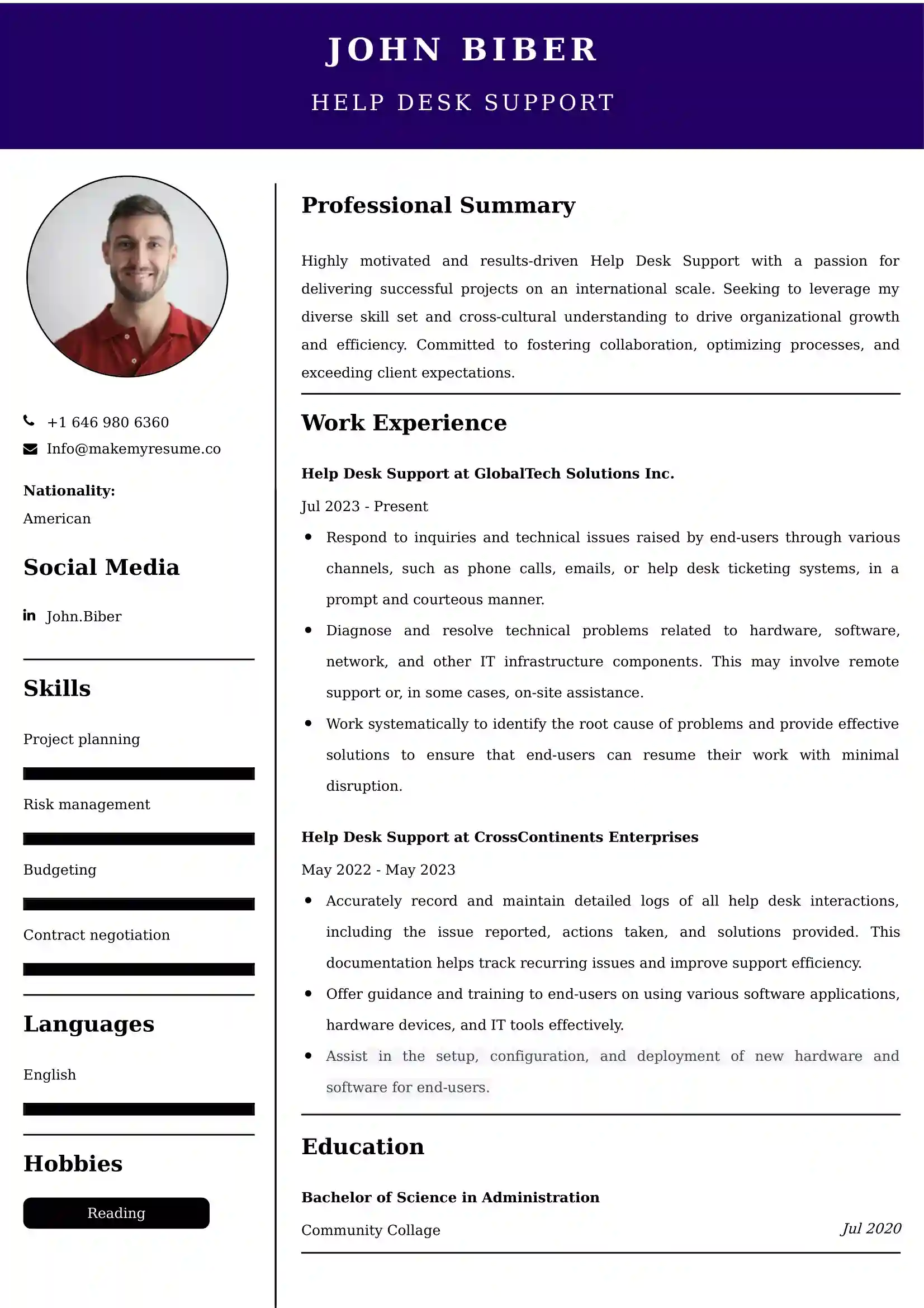
Superbresume.com empowers Help Desk Support staff to craft resumes that highlight their technical problem-solving and user satisfaction expertise. Our platform offers customizable templates tailored for IT roles, emphasizing skills like ITIL framework adherence, service level agreement (SLA) management, VOIP/network connectivity troubleshooting, and hardware break/fix. With ATS-optimized formats, expert-written content suggestions, and real-time resume analysis, we ensure your resume aligns with job descriptions. Showcase your experience in consistently achieving high first call resolution (FCR) rates, reducing ticket backlog, or successfully migrating users to new software platforms with confidence. Superbresume.com helps you create a polished, results-driven resume that grabs hiring managers’ attention and lands interviews.
How to Write a Resume for a Help Desk Support
Craft a Targeted Summary: Write a 2-3 sentence summary highlighting your expertise in first-level technical support, proficiency in troubleshooting operating systems and managing user accounts, and success in achieving high user satisfaction and fast resolution rates.
Use Reverse-Chronological Format: List recent help desk, technical support, or IT administration roles first, focusing on measurable resolution and customer service achievements.
Highlight Certifications/Training: Include credentials like CompTIA A+, Microsoft Certified Desktop Support Technician (MCDST), ITIL Foundation, or relevant customer service certifications to boost credibility.
Quantify Achievements: Use metrics, e.g., “Consistently maintained a First Call Resolution (FCR) rate of 80% and reduced average handle time (AHT) by 30 seconds,” or “Managed a ticket queue handling 50+ inbound issues daily, resolving 95% within the SLA,” to show impact.
Incorporate Keywords: Use terms like “First Call Resolution (FCR),” “Ticketing Systems (ServiceNow/Jira),” “Active Directory (User Management),” “Remote Desktop Support,” “Windows/Mac Troubleshooting,” “SLA Management,” or “Customer Service” from job descriptions for ATS.
Detail Technical Skills: List proficiency with specific ticketing systems, operating systems, networking basics (TCP/IP), Microsoft Office 365/Exchange, VPN/security tools, and hardware support in a comprehensive skills section.
Showcase Support Success: Highlight 3-4 key responsibilities or projects (e.g., leading a new software rollout, creating knowledge base documentation, managing a large-scale hardware refresh), detailing the scope and the efficiency/user satisfaction result.
Emphasize Soft Skills: Include patience, clear communication (for non-technical users), rapid problem-solving, attention to detail (documentation), and strong customer service orientation.
Keep It Concise: Limit your resume to 1 page, focusing on relevant technical support, problem-solving, and service experience.
Proofread Thoroughly: Eliminate typos or jargon for a professional document.
Remote Support and VPN/Cloud Access: Focus on expertise troubleshooting connectivity issues and managing access for remote employees using VPNs, cloud directories, and specialized remote desktop tools.
ITIL and Service Management: Highlight knowledge of ITIL principles (Incident, Problem, Change Management) and experience ensuring all support activities adhere to service management best practices.
Microsoft 365/Cloud Productivity Suite: Showcase deep proficiency troubleshooting issues related to cloud-based tools like Microsoft Teams, SharePoint Online, and Exchange Online (user provisioning, access issues).
Cybersecurity Awareness and Phishing: Detail experience educating users on phishing threats, managing basic endpoint protection software, and handling security incident reporting.
Knowledge Base Creation: Emphasize involvement in writing, updating, and managing internal and external facing articles in the knowledge base (e.g., Confluence, ServiceNow) to promote self-service.
Metrics-Driven Achievements: Use results like “Achieved a Customer Satisfaction (CSAT) rating of 95%+ for resolved tickets” or “Reduced recurring ticket volume by 10% by identifying and fixing root causes.”
Automated Provisioning and Deployment: Include basic experience supporting automated tools (e.g., SCCM, Intune) for deploying operating systems and standard software packages.
VOIP and Unified Communications Troubleshooting: Highlight expertise troubleshooting issues related to VOIP phones, video conferencing software, and unified communications platforms.
Choose Superbresume.com to craft a Help Desk Support resume that stands out in the competitive IT services field. Our platform offers tailored templates optimized for ATS, ensuring your skills in FCR, Active Directory, and customer satisfaction shine. With expert guidance, pre-written content, and real-time feedback, we help you highlight achievements like reducing ticket handle time or maintaining high user satisfaction. Whether you support internal staff or external clients, our tools make it easy to create a polished, results-driven resume. Trust Superbresume.com to showcase your expertise in reliable, efficient, and user-centric technical support. Start building your career today!
20 Key Skills for a Help Desk Support Resume
| Ticketing Systems (ServiceNow, Zendesk, Jira) | First Call Resolution (FCR) |
| Active Directory (User/Group/Password Management) | Remote Desktop Support (RDP, TeamViewer) |
| Windows 10/11 & Mac OS Troubleshooting | Microsoft 365/Exchange/Teams Support |
| Hardware Troubleshooting (PC, Laptop, Peripherals) | Network Troubleshooting (Basic TCP/IP, VPN) |
| ITIL Foundation Principles | Customer Satisfaction (CSAT) Management |
| SLA Adherence & Management | Anti-Virus/Endpoint Protection Management |
| Knowledge Base (KB) Documentation | VOIP & Telephony Troubleshooting |
| Patience & Clear Communication | Troubleshooting Methodologies |
10 Do’s for a Help Desk Support Resume
Tailor Your Resume: Customize for the environment (e.g., emphasize Mac OS/creative software for design firms, emphasize Active Directory/Windows for corporate IT).
Highlight Certifications/Training: List CompTIA A+, ITIL Foundation, or relevant Microsoft/Cisco certifications prominently.
Quantify Achievements: Include metrics on FCR rate, average handle time (AHT), customer satisfaction (CSAT) scores, or daily ticket volume managed.
Use Action Verbs: Start bullet points with verbs like “resolved,” “troubleshooted,” “managed,” “provisioned,” or “documented.”
Showcase Support Success: Detail projects or processes where your intervention measurably improved user efficiency or reduced recurring issues.
Include Soft Skills: Highlight clear communication, patience, rapid problem-solving, and strong service orientation.
Optimize for ATS: Use standard IT support section titles and incorporate key system and metric terms.
Keep It Concise: Limit your resume to one page, focusing on relevant technical support, system management, and service experience.
Emphasize Efficiency and FCR: Clearly articulate experience resolving issues quickly and effectively on the first contact.
Proofread Carefully: Ensure no typos or errors in technical terms, software names, or metrics.
10 Don’ts for a Help Desk Support Resume
Don’t Overload with Jargon: Avoid confusing, internal company acronyms; use standardized ITIL, network, and application terminology.
Don’t Exceed One Page: Keep your resume sharp and focused on the most relevant, measurable support duties.
Don’t Omit Dates: Include employment dates for career context.
Don’t Use Generic Templates: Tailor your resume specifically to the technical troubleshooting and customer-facing duties of a Help Desk role.
Don’t List Irrelevant Skills: Focus on operating systems, network basics, ticketing systems, Active Directory, and cloud productivity tools.
Don’t Skip Metrics: Quantify results wherever possible; FCR, CSAT, and AHT are critical metrics.
Don’t Use Complex Formats: Avoid highly stylized elements or confusing graphics.
Don’t Ignore Documentation: Include experience contributing to or managing the knowledge base.
Don’t Include Outdated Experience: Omit non-IT or irrelevant administrative jobs over 10 years old.
Don’t Forget to Update: Refresh for new certification mastery, successful software migration support, or advanced troubleshooting techniques.
5 FAQs for a Help Desk Support Resume
Prioritize high First Call Resolution (FCR), Active Directory user management, ticketing system proficiency (ServiceNow), and strong Windows/Mac troubleshooting skills.
Use standard IT support section titles, avoid graphics, and include keywords like “FCR,” “Active Directory,” and “Remote Support.”
Yes, quantifying customer satisfaction (CSAT) demonstrates a user-centric approach and is highly valued.
Detail a process change (e.g., new troubleshooting script, KB article) that resulted in a quantified reduction in time (e.g., Average Handle Time, AHT).
Use a reverse-chronological format to emphasize your most recent, high-impact technical support and user service achievements.
Get 5x more interviews with our crafted Resumes. We make resumes that land jobs.

Get a Free Customized Cover Letter with Resume Expert Advice
with every resume order placed, you will get a free Customized Cover letter.