Legal Secretary
Welcome to our Legal Secretary resume sample page! This expertly crafted resume template is designed to showcase your expertise in providing comprehensive administrative support, managing attorney schedules, preparing and formatting legal documents, handling communications, and maintaining accurate legal files and docketing. Whether you work in a law firm or corporate legal department, this sample highlights key skills like legal document formatting (TOA/TOC), complex calendaring, e-filing, dictation/transcription, and strict adherence to confidentiality tailored to meet top legal demands. Use this guide to create a compelling resume that stands out and secures your next career opportunity.
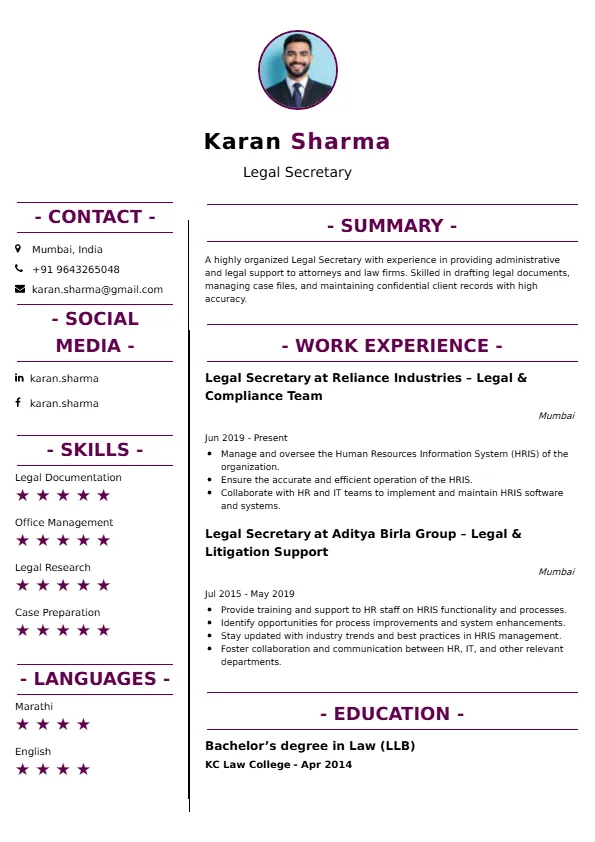
Superbresume.com empowers Legal Secretaries to craft resumes that highlight their organizational precision and expert document management. Our platform offers customizable templates tailored for legal administrative roles, emphasizing skills like advanced MS Word features (Styles, TOC/TOA), legal billing system proficiency, client intake, and managing complex attorney correspondence. With ATS-optimized formats, expert-written content suggestions, and real-time resume analysis, we ensure your resume aligns with job descriptions. Showcase your experience in managing multiple attorney calendars, flawlessly preparing documents for court filing, or maintaining strict confidentiality with client and case information with confidence. Superbresume.com helps you create a polished, results-driven resume that grabs hiring managers’ attention and lands interviews.
How to Write a Resume for a Legal Secretary
Craft a Targeted Summary: Write a 2-3 sentence summary highlighting your extensive experience supporting attorneys, proficiency in legal document formatting and e-filing, and success in managing calendars, correspondence, and ensuring strict adherence to legal deadlines and confidentiality.
Use Reverse-Chronological Format: List recent legal secretary, administrative assistant (legal focus), or paralegal roles first, focusing on measurable administrative and document management achievements.
Highlight Certifications/Training: Include credentials like Paralegal Certificate (if applicable), Certified Legal Secretary Specialist (CLSS), advanced legal software training (e.g., dictation/billing), or MS Office Specialist certification to boost credibility.
Quantify Achievements: Use metrics, e.g., “Supported 3 senior partners simultaneously, managing complex calendars and 100% of e-filing submissions with zero rejections,” or “Prepared and formatted 50+ litigation documents monthly (TOC/TOA), saving 10 hours of attorney time monthly,” to show impact.
Incorporate Keywords: Use terms like “Legal Document Formatting,” “E-Filing & Docketing,” “Complex Legal Calendaring,” “Dictation & Transcription,” “Confidentiality & Discretion,” “Legal Correspondence,” “Time & Billing Software (e.g., Clio),” or “Attorney Support” from job descriptions for ATS.
Detail Administrative/Technical Skills: List proficiency with specific software (legal billing, dictation systems), MS Office Suite (advanced Word), e-filing portals, legal terminology, and file management systems in a dedicated skills section.
Showcase Document/Filing Success: Highlight 3-4 key responsibilities or projects (e.g., managing the pleading index for a complex case, standardizing document templates, streamlining communication flow), detailing the scope and the efficiency/compliance result.
Emphasize Soft Skills: Include meticulous attention to detail, professionalism, strong written/verbal communication, organization, adherence to confidentiality, and excellent time management.
Keep It Concise: Limit your resume to 1-2 pages, focusing on relevant legal administrative, document management, and organizational experience.
Proofread Thoroughly: Eliminate typos or jargon for a professional document.
E-Filing and Digital Docketing: Focus on mastery of electronic court filing systems (federal and state) and managing the associated digital docketing and deadline tracking within the firm's system.
Advanced MS Word & Document Assembly: Highlight expertise using advanced features of MS Word (styles, tables of contents/authorities, templates) to produce court-ready, perfectly formatted legal documents efficiently.
Virtual and Digital Workflow: Showcase experience utilizing digital communication tools, secure file sharing (e.g., NetDocuments), and virtual meeting setup for attorneys and clients.
Time & Billing System Proficiency: Detail proficiency entering attorney time, generating invoices, and managing client billing inquiries within specialized legal billing software.
Specialized Legal Transcription: Emphasize accuracy and speed in transcribing dictation (voice or written notes) for legal memos, correspondence, and initial document drafts.
Metrics-Driven Achievements: Use results like “Successfully managed the calendars and deadlines for 3 busy litigation attorneys, resulting in zero missed court dates” or “Reduced attorney filing time by 20% through standardized e-filing protocols.”
Confidentiality and Data Security: Include explicit experience managing privileged and highly sensitive client/case data while adhering to strict ethical and data security protocols.
Client Intake and Communication: Highlight experience handling initial client calls, scheduling consultations, and ensuring professional, discreet communication with clients and opposing counsel.
Choose Superbresume.com to craft a Legal Secretary resume that stands out in the highly demanding administrative legal sector. Our platform offers tailored templates optimized for ATS, ensuring your skills in legal document preparation, calendaring, and e-filing shine. With expert guidance, pre-written content, and real-time feedback, we help you highlight achievements like managing complex attorney schedules or maintaining flawless docketing compliance. Whether you support one attorney or a team, our tools make it easy to create a polished, results-driven resume. Trust Superbresume.com to showcase your expertise in precise, professional, and discreet legal administration. Start building your career today!
20 Key Skills for a Legal Secretary Resume
| Legal Document Formatting (TOC/TOA/Styles) | Complex Calendar & Schedule Management |
| E-Filing & Court Portal Submissions | Legal Docketing & Deadline Tracking |
| Dictation & Transcription (Speed/Accuracy) | Confidentiality & Attorney-Client Privilege Adherence |
| MS Office Suite (Advanced Word/Outlook) | Legal Terminology & Correspondence Drafting |
| Client Intake & Communication (Professional) | Time & Billing Software (e.g., Clio, TimeSlips) |
| File Management (Physical/Digital) | Trial/Hearing Preparation Support |
| Meticulous Attention to Detail | Organizational Excellence |
10 Do’s for a Legal Secretary Resume
Tailor Your Resume: Customize for the specific practice area (e.g., litigation, intellectual property, corporate) and the level of attorney supported.
Highlight Certifications/Training: List CLSS or advanced MS Office/legal software certifications prominently.
Quantify Achievements: Include metrics on number of attorneys supported, volume of documents prepared, typing/transcription speed, or compliance rate with deadlines.
Use Action Verbs: Start bullet points with verbs like “prepared,” “managed,” “filed,” “transcribed,” or “coordinated.”
Showcase Document/Filing Mastery: Detail expertise in formatting court-ready documents and navigating e-filing systems.
Include Soft Skills: Highlight meticulous detail, professionalism, strong written/verbal communication, and discretion.
Optimize for ATS: Use standard legal section titles and incorporate key administrative and filing terms.
Keep It Professional: Use a clean, consistent font and professional layout.
Emphasize Deadlines and Accuracy: Clearly articulate expertise in managing critical deadlines (docketing) and ensuring flawless document preparation.
Proofread Thoroughly: Eliminate typos or errors; precision is mandatory.
10 Don’ts for a Legal Secretary Resume
Don’t Overload with Jargon: Avoid confusing, internal firm or case-specific acronyms; use standardized legal terminology.
Don’t Exceed Two Pages: Keep your resume concise, focusing on high-impact legal administrative and document management achievements.
Don’t Omit Dates: Include employment dates for career context.
Don’t Use Generic Templates: Tailor your resume specifically to the detailed, high-stakes duties of a Legal Secretary.
Don’t List Irrelevant Skills: Focus on document management, calendaring, e-filing, transcription, and legal support.
Don’t Skip Metrics: Quantify results wherever possible; link achievements to efficiency, accuracy, or deadline compliance.
Don’t Use Complex Formats: Avoid highly stylized elements or confusing graphics.
Don’t Ignore Technology: Include mastery of legal-specific software (billing, dictation) and e-filing platforms.
Don’t Include Outdated Experience: Omit non-legal or non-administrative jobs over 15 years old.
Don’t Forget to Update: Refresh for new software mastery, successful filing cycles, or advanced document automation techniques.
5 FAQ's for a Legal Secretary Resume
"Managed complex travel and multi-stakeholder calendars for 3 Senior Partners."
Yes, if it is 70+ WPM. It remains a baseline requirement for high-volume legal secretarial roles.
"Expert in TOA (Table of Authorities) and TOC (Table of Contents) generation for appellate briefs."
Yes. "Managed monthly billing cycles and time-entry reconciliation using Aderant or Elite."
Yes. "Strict adherence to attorney-client privilege and secure document handling protocols."
Get 5x more interviews with our crafted Resumes. We make resumes that land jobs.

Get a Free Customized Cover Letter with Resume Expert Advice
with every resume order placed, you will get a free Customized Cover letter.